
CCNA v3 Routing and Switching ICND1 Lab Workbook

Hands-on CCNA v3 ICND1 lab workbook with practical exercises for configuring routers, switches, and network protocols. Ideal for students preparing for Cisco certification with real-world networking scenarios.

Daniel Miller
Contributor
4.3
48
10 months ago
Preview (33 of 109 Pages)
100%
Log in to unlock

Page 1

CCNA v3 Routing and Switching ICND1 Lab Workbook - Page 1 preview image

Loading page ...

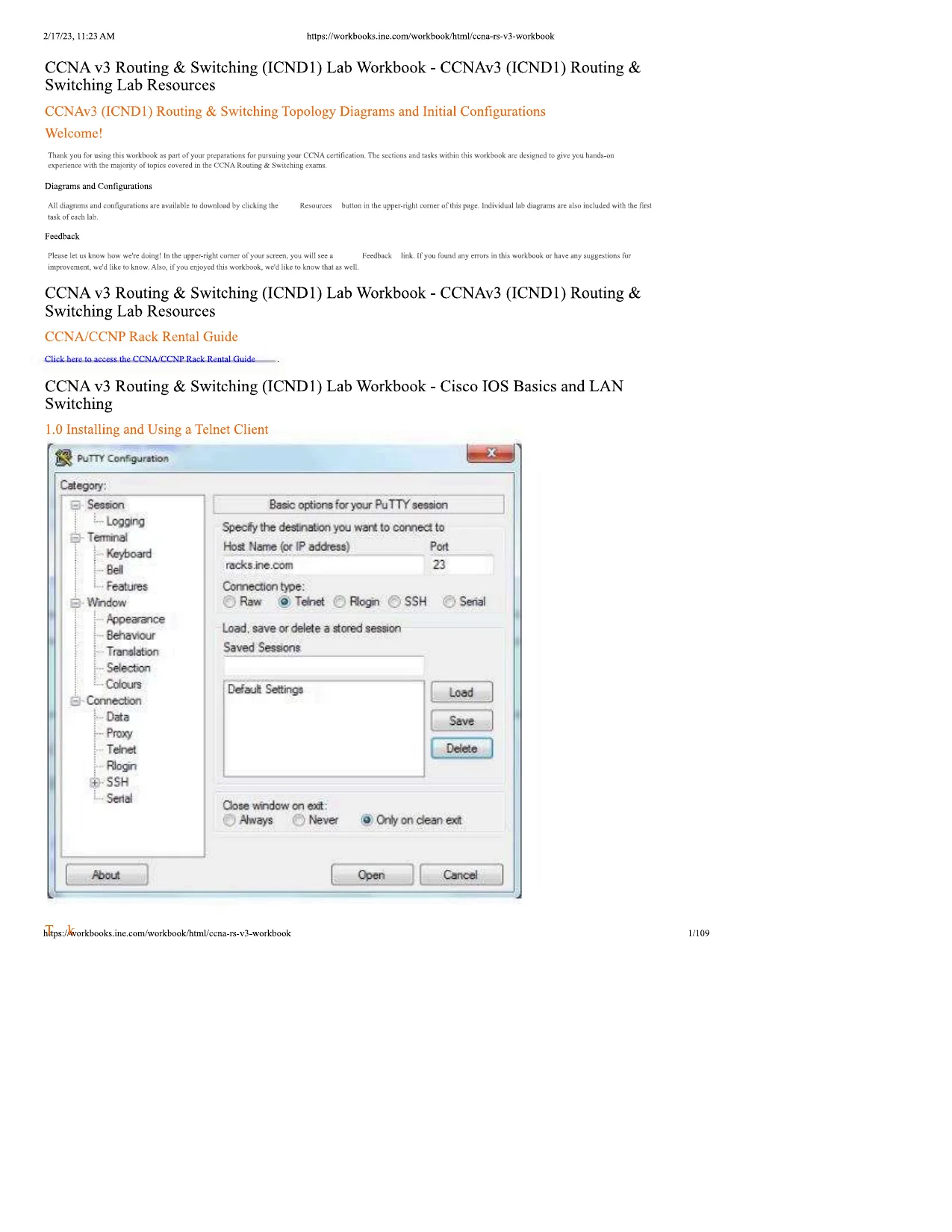
2/17/23, 11:23 AMhttps://workbooks.ine.com/workbook/html/ccna-rs-v3-workbookCCNA v3 Routing & Switching (ICND1) Lab Workbook - CCNAv3 (ICND1) Routing &Switching Lab ResourcesCCNAv3 (ICND1) Routing & Switching Topology Diagrams and Initial ConfigurationsWelcome!Thank you for using this workbook as part of your preparations for pursuing your CCNA certification. The sections and tasks within this workbook are designed to give you hands-onexperience with the majority of topics covered in the CCNA Routing & Switching exams.Diagrams and ConfigurationsAll diagrams and configurations are available to download by clicking theResourcesbutton in the upper-right comer of this page. Individual lab diagrams are also included with the firsttask of each lab.FeedbackPlease let us know how we're doing! In the upper-right comer of your screen, you will see aFeedbacklink. If you found any errors in this workbook or have any suggestions forimprovement, we'd like to know. Also, if you enjoyed this workbook, we'd like to know that as well.CCNA v3 Routing & Switching (ICND1) Lab Workbook - CCNAv3 (ICND1) Routing &Switching Lab ResourcesCCNA/CCNP Rack Rental GuideClick here to access the CCNA/CCNP Rack Rental GuideCCNA v3 Routing & Switching (ICND1) Lab Workbook - Cisco IOS Basics and LANSwitching1.0 Installing and Using a Telnet Client;.ine.com/workbook/html/ccna-rs-v3-workbook1/109

Page 2

CCNA v3 Routing and Switching ICND1 Lab Workbook - Page 2 preview image

Loading page ...

2/17/23, 11:23 AMTaskshttps://workbooks.ine.com/workbook/html/ccna-rs-v3-workbookThis task assumes you are new to networking and have never used a Telnet Client application before. In this lab you will download one such client (PuTTY) and configure it forconnecting to INE's Rack Rentals.To begin with, within your web browswer open a page toPutty.orgIf you are using a Mac Laptop find a version of PuTTY suitable for your operating system. At the time of this writing,this link would get you one."Download the application.O®.putty-DrgBcckiTiarktOGcogiejr]Cisco -FeMra[NE SteaESafar- The b«t hook? ?GM53-R<Download PuTTY/PuTTY is an SSH and telnet client,. developsoftware that is available wlUa/ource codeYou can download PuTTY here.Alternative binary filesFhc lUitHkf package; above wdl provide n31of these (except PuTTYiel). bur you can download64 -bit vetBion:Rood the L-A<? entiy.lputty, tn-? (riie SSI I -md32-bit:cutty .M-bir :(Not sure whether you w-or bv r JP'isignature =(or by J I Mc;igaaturc'iConfigure PuTTY to match what you see here. The relevant things to change are;Hostname = racks.ine.comConnection type = TelnetPort = 23https://workbooks.ine.com/workbook/html/ccna-rs-v3-workbook2/109

Page 3

CCNA v3 Routing and Switching ICND1 Lab Workbook - Page 3 preview image

Loading page ...

2/17/23, 11:23 AMhttps://workbooks.ine.com/workbook/html/ccna-rs-v3-workbookIf you've done everything correctly, when you click theOpenbutton you should see a screen that looks like this;Jracks ine.com - PuTTYUserAccess Verificationsername: |CCNA v3 Routing & Switching (ICND1) Lab Workbook - Cisco IOS Basics and LANSwitching1.1 IOS Basics - Returning a Switch back to Factory Defaultr.tps:/korkbooks.ine.com/workbook/html/ccna-rs-v3-workbook3/109

Page 4

CCNA v3 Routing and Switching ICND1 Lab Workbook - Page 4 preview image

Loading page ...

2/17/23, 11:23 AMTaskhttps://workbooks.ine.com/workbook/html/ccna-rs-v3-workbookLogin to Switch-1 in your rack and perform the following actions:Enter Privileged EXEC Mode (also called, "Enable Mode")Erase your Startup-Config Hile (the command used should begin with the worderase )If you see a message that begins,Erasing the nvram filesystem...and are asked to confirm, press your Enter/Return key on the keyboard to confirmDelete the vlan.dat file (that stores VLAN and VTP infonnation) by using the command,delete flash:vlan.dat(hit your Entcr/Rctum key twice to confirm)Enter theReloadcommandIf prompted to save your config your answer should beNoIf prompted with a query,Proceed with reloadpress your Enter Return key to confirm.Wait several minutes. The reload will be completed when you see the message,Press RETURN to get started!Press your Enter/Return key and you should see a message asking if you want to enter the initial configuration dialog.ConfigurationSwl>cnablcSwl#Erasing the nvram filesystem will remove all configuration files! Continue? | confirm][OK]Erase of nvram: completeSwl#*Mar7 03:33:45.254: %SYS-7-NV_BL0CK_INIT: Initialized the geometry of nvramSwl#Swl#Delete filename [vlan.dat]?Delete flash:vlan.dat? [confirm]Swl#Swl#Proceed with reload? [confirm]*Mar7 03:36:00.068: %SYS-5-RELOAD: Reload requested by console. Reload reason: Reload commandBoot Sector Filesystem (bs) installed, fsid: 2Base ethernet MAC Address: 00:14:f2:4d:c5:80Xmodem file system is available.The password-recovery mechanism is enabled.Initializing Flash...flashfsfO]: 11 files, I directoriesflashfs[O]: 0 orphaned files, 0 orphaned directoriesflashfsfO]: Total bytes: 15098976fiashfs[O]: Bytes used: 12772864fiashfs[O]: Bytes available: 3226112flashfs[O]: flashCs fsck took 9 seconds....done Initializing Flash.done.Loading "flash:/dumtny"...flash:/dummy: no such file or directoryError loading "flash:/dummy"Interrupt within 5 seconds to abort boot process.Loading "flash:/c3560-ipservicesk9-mz.122-55.SE9.bin"..File ''flash.7c3560-ipservicesk9-mz.l22-55.SE9.bin" uncompressed and installed, entry point: 0x1000000executing...Restricted Rights LegendUse, duplication, or disclosure by the Government issubject to restrictions as set forth in subparagraph(c) of the Commercial Computer Software - RestrictedRights clause at FAR sec. 52.227-19 and subparagraph(c) (1) (ii) of the Rights in Technical Data and ComputerSoftware clause at DFARS sec. 252.227-7013.cisco Systems. Inc.170 West Tasman DriveSan Jose, California 95134-1706Cisco IOS Software, C3560 Software (C3560-1PSERV1CESK9-M). Version 12.2(55 )SE9. RELEASE SOFTWARE (fcl)Technical Support: http://www.cisco.com/tcchsupportCopyright (c) 1986-2014 by Cisco Systems, Inc.https://workbooks.ine.com/workbook/html/ccna-rs-v3-workbook4/109

Page 5

CCNA v3 Routing and Switching ICND1 Lab Workbook - Page 5 preview image

Loading page ...

2/17/23, 11:23 AMhttps://workbooks.ine.com/workbook/html/ccna-rs-v3-workbookCompiled Mon O3-Mar-I4 22:36 by prod_rcl_tcamImagetext-ba.se: 0x01000000, data-base: Ox02FOOOOOInitializing flashfs...flashfs[l]: II files, 1 directoriesflashfs[l]: 0 orphaned fdes, 0 orphaned directoriesflashfc[l]: Total bytes: 15998976flashfsfl]: Bytes used: 12772864flashfs[l]: Bytes available: 3226112flashfs[ I]: flashfs fsck took I seconds.flashfsj I]: Initialization complete....done Initializing flashfs.Checking for Bootloader upgrade., not neededPOST: CPU MIC register Tests : BeginPOST: CPU MIC register Tests : End. Status PassedPOST: PortASIC Memory Tests : BeginPOST: PortASIC Memory Tests : End, Status PassedPOST: CPU MIC interface Loopback Tests : BeginPOST: CPU MIC interface Loopback Tests : End, Status PassedPOST: PortASIC RingLoopback Tests : BeginPOST: PortASIC RingLoopback Tests : End, Status PassedPOST: Inline Power Controller Tests : BeginPOST: Inline Power Controller Tests : End, Status PassedPOST: PortASIC CAM Subsystem Tests : BeginPOST: PortASIC CAM Subsystem Tests : End. Status PassedPOST: PortASIC Pot! Loopback Tests : BeginPOST: PortASIC Port Loopback Tests : End, Status PassedWaiting for Port download ..CompleteThis product contains cryptographic features and is subject to UnitedStates and local country laws governing import, export, transfer anduse. Delivery of Cisco cryptographic products does not implythird-party authority to import, export, distribute or use encryption.Importers, exporters, distributors and users are responsible forcompliance with U.S. and local country laws. By using this product youagree to comply with applicable laws and regulations. If you are unableto comply with U.S. and local laws, return this product immediately.A summary of U.S. laws governing Cisco cryptographic products may be found at:http://www.cisco.com/wwl/cxport/cryptoAool/stqrg.htmlIf you require further assistance please contact us by sending email tocxport@cisco.com.cisco WS-C3560-24PS (PowcrPC405) processor (revision MO) with 131072K bytes of memory'.Processor board II) CAT0928Z0DNLast reset from powcr-on1 Virtual Ethernet interface24 FastEthcmct interfaces2 Gigabit Ethernet interfacesThe password-recovery mechanism is enabled.5I2K bytes of flash-simulated non-volatile configuration memory.Base ethernet MAC Address: 00: 14:F2:4D:C5:8OMotherboard assembly number: 73-9673-06Power supply part number: 341-0029-03Motherboard serial number: CAT09280SYJPower supply serial number: DTH09227KGKModel revision number: MOMotherboard revision number: AOModel number: WS-C3560-24PS-SSystem serial number: CAT0928Z0DNTop Assembly Part Number: 800-25861-03Top Assembly Revision Number: AOhttps://workbooks.ine.com/workbook/html/ccna-rs-v3-workbook5/109

Page 6

CCNA v3 Routing and Switching ICND1 Lab Workbook - Page 6 preview image

Loading page ...

2/17/23, 11:23 AMhttps://workbooks.ine.com/workbook/html/ccna-rs-v3-workbookVersion ID: V05CLEI Code Number: COM1X00ARBHardware Board Revision Number: 0x01Switch Ports ModelSW VersionSW ImageI 26WS-C3560-24PSI2.2(55)SE9C3560-TPSERVICESK9-MFV-HL LO-IUOi UJ4L Lid.'U N ICCNA v3 Routing & Switching (ICND1) Lab Workbook - Cisco IOS Basics and LANSwitching1.2 IOS Basics - Initial Configuration DialogTaskYou must first complete Task-1 (Setting a Switch back to Factory Default) prior to doing this task.At this point, while in Switch-1 you should be prompted to enter the Initial Configuration Dialog.Typically, after you've gained some basic proficiency with the Cisco IOS Command-Line (CLI) you will bypass the Initial Configuration Dialog. But in this section you'll gointo it, and manipulate/configure a few values just to get a feel for what it does.Type "yes" to enter the Dialog.*Enter Yes to enter the Basic Management Setup.*Provide your switch a hostname ofSwitch-1Provide an enable secret ofINE (all in caps)*Try to also configure an enable password ofINE. What happens?Provide an enable password ofcisco(lowercase)"Provide a Virtual Terminal Password ofINE (all caps)*For "Configure SNMP Network Management?" hit your Return key*When prompted for, "Enter interface name used.." typeFastEthernetO/1TypeNo to bypass all other configuration options.When given three selections (to Go to the IOS prompt, Return back to setup, or Save this configuration) selectnumber 2to "Save your configuration to NVRAM and exit".At this point you have configured four things, a "hostname", an "enable secret", an "enable password" and a Telnet password...and you can see that it was quite a lengthyprocess (using the initial configuration dialog) to do that. This is why most people bypass this dialog.ConfigurationWould you like to enter the initial configuration dialog? [yes/no]:At any point you may enter a question mark ’?' for help.Use ctrl-c to abort configuration dialog at any prompt.Default settings are in square brackets '[]’.Basic management setup configures only enough connectivitylor management of the system, extended setup will ask youto configure each interface on the systemWould you like to enter basic management setup? [yes/no]:'iT IConfiguring global parameters:Enter host name [Switch]:W.liTiIThe enable secret is a password used to protect access toprivileged EXEC and configuration inodes. This password, afterentered, becomes encrypted in the configuration.Enter enable secret:nThe enable password is used when you do not specify anenable secret password, with some older software versions, andsome boot images.Enter enable password:I Bi1i1 b *«L JiHfnrth - »+b» r«*la«n ->iEnter enable password:|The virtual terminal password is used to protectaccess to the router over a network interface.https://workbooks.ine.com/workbook/html/ccna-rs-v3-workbook6/109

Page 7

CCNA v3 Routing and Switching ICND1 Lab Workbook - Page 7 preview image

Loading page ...

2/17/23, 11:23 AMhttps://workbooks.ine.com/workbook/html/ccna-rs-v3-workbookEnter virtual terminal password: INEConfigure SNMP Network Management? [no]:Current interface summaryInterfaceIP-AddressOK? Method StatusProtocolVlanlunassignedYES unsetupupFastEthernetO/lunassignedYES unsetupUPFastEthernetO/2unassignedYES unsetupupFastEthemetO/3unassignedYES unsetdowndownFastEthernetO/4unassignedYES unsetdowndownFastEthernetO/5unassignedYES unsetdowndownFastEthernetO/6unassignedYES unsetdowndownFastEthemetO/7unassignedYES unsetdowndownFastEthemetO/8unassignedYES unsetdowndownFastEthemetO/9unassignedYES unsetdowndownFastEthernetO/IOunassignedYES unsetupupFastEthemetO/11unassignedYES unsetupupFastEthemetO/12unassignedYES unsetdowndownFastEthemetO/13unassignedYES unsetdowndownFastEthemetO/14unassignedYES unsetupupFastEthemetO/15unassignedYES unsetupupFastEthemetO/16unassignedYES unsetdowndownFastEthemetO/17unassignedYES unsetdowndownFastEthemetO/IXunassignedYES unsetdowndownFastEthemetO/19unassignedYES unsetdowndownFastEthernet0/20unassignedYES unsetdowndownFasiElhemetO/21unassignedYES unsetdowndownFastEthemetO/22unassignedYES unsetdowndownFastEtheraetO/23unassignedYES unsetdowndownFastEthemetO/24unassignedYES unsetdowndownGigabitEthemetO/1unassignedYES unsetdowndownGigabitEthemetO/2unassignedYES unsetdowndownEnter interface name used to connect to themanagement network from the above interface summary:f'WtttKmwtJ]Configuring interface FastEthemetO/1:Configure IP on this interface? [no]:Would you like to enable as a cluster command switch? [yes/no]:>The following configuration command script was created:FriUiW Arild-Lwent J4 U NE l K aline vty 0 15no ip routinginterface Vlanlshutdownno ip addressinterface FastEthcrnctO/1no shutdownno ip addressinterface FastEthemetO/2interface FastEthernetO/3interface FastEthernetO/4interface FastEthernetO/5interface FastEthernetO/6interface FastEthernetO/7https://workbooks.ine.com/workbook/html/ccna-rs-v3-workbook7/109

Page 8

CCNA v3 Routing and Switching ICND1 Lab Workbook - Page 8 preview image

Loading page ...

2/17/23, 11:23 AMhttps://workbooks.ine.com/workbook/html/ccna-rs-v3-workbookinterface FastEthcmctO/8interface FastEthcrnctO/9interface FastEthcmctO/IOinterface FastEthernctO/l Iinterface FastEthernetO/12interface FastEthemetO/13interface FastEthernetO/14interface FastEthernetO/15interface FastEthernetO/16interface FastEthernetO/17interface FastEthemetO/18interface FastEthemetO/19interface FastEthernetO/20interface FastEthernetO/21interface FastEthernetO/22interface FastEthemetO/23interface FastEthemetO/24interface GigabitEthemetO/1interface GigabitEthcmetO/2end[0] Go to the IOS command prompt without saving this config.[1] Return back to the setup without saving this config.[2] Save this configuration to nvram and exit.Enter your selection [2]:CCNA v3 Routing & Switching (ICND1) Lab Workbook - Cisco IOS Basics and LANSwitching1.3 IOS Basics - Initial "show" commands and IOS ModesTaskThis task assumes you have erased your Startup-Config file in your switch, reloaded it, and either bypassed the Initial Configuration Dialog, or you completed theprevious task that walked you through that Dialog.Enter Privileged EXEC mode on Switch-1 (the password should be1NE from the previous task).Enter the command,show running-configto view your Running-Config file.When prompted with themoreprompt hit your Return key to progress forward line-by-line, or hit your spacebar to receive another 25-lines of output.fr Take note of the general layout of the output of this command. Specifically noting that:General, global-level commands and features appear first in the output8Interfaces and their configurations are displayed nextLine configuration information (Telnet VTY and Console) finish the configuration*Issue the command,show startup-configand look through the output.*At the moment, your Startup-Config and Running-Config are probably identifical.As you begin to learn and memorize new Cisco IOS commands. It might be beneficial for you to make a chart with three, vertical columns:https://workbooks.ine.com/workbook/html/ccna-rs-v3-workbook8/109

Page 9

CCNA v3 Routing and Switching ICND1 Lab Workbook - Page 9 preview image

Loading page ...

2/17/23, 11:23 AMhttps://workbooks.ine.com/workbook/html/ccna-rs-v3-workbookObjective10S CommandIOS Configuration ModeUsing a chart of this type you could fill out the first row as follows:ObjectiveIOS CommandIOS Configuration ModeView current configuration of deviceshow running-configPrivileged EXEC/Enable Mode (Device#)While in Privileged EXEC mode, issue the following commands, familiarize yourself with the output and add to your IOS chart:show version*show ip interface briefshow interface statusEnter Global Configuration Mode using the command,configure terminaland perform the following actions;*Remove your enable password, and your enable secret password.*Change the hostname of your switch toSW1Enter a command so that mistyped commands won't attempt to be resolved by DNS lookups in the future.*Enter a new Enable Password ofciscoEnter line configuration mode for your console port (from Global Configuration Mode) by typing,line console 0*Add a password ofciscoto your console portAdd a command so that in the future, when a Syslog message appears while you’re typing, what you typed prior to the message will be repeated after that message isdisplayed.From within line-configuration mode, enter a single, one-word command that will place you back at Privileged EXEC mode.Save your Running-Config to your Startup-Config using an IOS command that begins with the word,copyConfigurationSwitch-1>BHafalaPassword:Switch-1#Enter configuration commands, one per line.Switch-l(config)#n J*Switch-l(config)#FUWt-’.-lI K J VSwitch-1(config)#IwihnarW iSwl (con fig)#TC- 1 liadn-liotupSwl (config)#(riMM-di t sjSwl (config)#1 1Swl(config-line)#"•»■■■*iiriMSwl(config-line)#1 hff ISwl (config-line)#End with CNTL/Z.*Mar1 02:54:45.415: %SYS-5-C0NFIG_l: Configured from console by consoleDestination filename [startup-config]?Building configuration...[OK]0 bytes copied in 1.208 secs (0 bytes/sec)Swl#CCNA v3 Routing & Switching (ICND1) Lab Workbook - Cisco IOS Basics and LANSwitching1.4 IOS Basics - CDP and InterfacesTaskpAccess the CLI (Command-Line Interface) of Switch-1 in your rack.Enter Privileged EXEC Mode (Enable Mode)Enter Global Configuration ModeUse the command,interface range FastEthemetO/I - 24to enter this range of interfaces. Notice how your prompt has changed to reflectSWl(config-if-range)#Shutdown all interfaces at once. Wait a few moments and notice all of the Syslog output you receive.Notice that when you shutdown interfaces they are displayed as being"administratively down"*Enable all interfaces at once and wait a few moments for the Syslog output to finish.Access the CLI of Switch-2 and Switch-3 in your topology and administratively enable all FastEthcrnct interfaces on these two switches.https://workbooks.ine.com/workbook/html/ccna-rs-v3-workbook9/109

Page 10

CCNA v3 Routing and Switching ICND1 Lab Workbook - Page 10 preview image

Loading page ...

2/17/23, 11:23 AMhttps://workbooks.ine.com/workbook/html/ccna-rs-v3-workbookGo back to Switch-1 and, from Privileged EXEC mode, issue the command,show cdp neighbor. Take note of the type of output you obtain from this command.Issue the same command again but adding a space, followed by a question mark like this,command.show cdp neighbor ?and take note of the additional keywords you could add to thisTry out the command again using thedetailkeyword to see the difference in output.ConfigurationswianF**p.Enter configuration commands, one per line.End with CNTL/Z.SWl(config)#IH.v'x,24L. J.-V—SW I(config-if-range)#SW I(config-if-range)#SW I(config-if-range)#*Mar8 01:51:53.374: %LINK-5-CHANGED: Interface FastEthemetO/1, changed state to administratively down*Mar8 01:51:53.399: %LINK-5-CHANGED: Interface FastEthernetO/2, changed state to administratively down8 01:51:53.424: %LINK-5-CHANGED: Interface FastEthemetO/3, changed state to administratively down*Mar*Mar8 01:51:53.450: %LINK-5-CHANGED: Interface FastEthernetO/4, changed state to administratively down8 01:51:53.475: %LINK-5-CHANGED: Interface FaslEthernelO/5, changed stale to ad*MarSW l(conllg-if-range)#SW 1(config-if-range)#SW1#*Mar8 01:55:22.024: %LTNK-3-UPDOWN: Interface FastEthemetO/1, changed state to down*Mar8 01:55:22.049: %LlNK-3-UPDOWN: Interface FastEthemetO/2, changed state to down*Mar8 01:55:22.074: %LlNK-3-UPDOWN: Interface FastEthemetO/3, changed state to down*Mar8 01:55:22.099: %LTNK-3-UPDOWN: Interface FastEthemetO/4, changed state to down8 01:55:22.116: %LlNK-3-UPDOWN: Interface FastEthemetO/5. changed state to down*Mar*Mar8 01:55:23.375: %LlNEPROTO-5-UPDOWN: Line protocol on Interface FastEthernetO/lO, changed state to up*Mar8 01:55:23.375: %LlNEPROTO-5-UPDOWN: Line protocol on Interface FastEthemetO/11. changed state to upSW1#Switch sw2#Swilch_sw2#i.ftEnter configuration commands. one per line.End with CNTL/Z.fin11JAtriSwitch_sw2(config)#Switch_sw2(config-if-range)#Switch_sw2(config-if-rangc)#Switch sw2#Switch sw3#CWfEEnter configuration commands, one per line.End with CNTL/Z.ru<:14Switch_sw3(config)#Switch_sw3(config-if-rangc)#Switch_sw3(config-if-rangc)#Switch_sw3#swi#ira:* r<i|»xCapability Codes: R - Router, T - Trans Bridge, B - Source Route BridgeS - Switch, H - Host, I - IGMP, r- Repeater, P - Phone,D - Remote, C - CVTA, M - Two-port Mac RelayDkrv'■■13L a a ll a i r l i - rf c I M vSii i L i b yF l a l F - nF a iIE-RouterFas 0/22162RB SI 2811Fas 0/0/1RouterFas 0/21167RB SI 2811Fas 0/0/0RouterFas 0/24143R B S I 2 8 I IFas 0/0/2Switch_sw3Fas 0/14165STWS-C3560- Fas 0/14Switch_sw3Fas 0/15165SIWS-C3560- Fas 0/15Switch_sw3Fas 0/13165STWS-C3560- Fas 0/13Switch_sw2Fas 0/12165STWS-C3560- Fas 0/12Switch_sw2Fas 0/11165SIWS-C3560- Fas 0/11Switch_sw2Fas 0/10165STWS-C3560- Fas 0/10SW1#https://workbooks.ine.com/workbook/html/ccna-rs-v3-workbook10/109

Page 11

CCNA v3 Routing and Switching ICND1 Lab Workbook - Page 11 preview image

Loading page ...

2/17/23, 11:23 AMhttps://workbooks.ine.com/workbook/html/ccna-rs-v3-workbookCCNA v3 Routing & Switching (ICND1) Lab Workbook - Cisco IOS Basics and LANSwitching1.5 Adding an IP Address to an SVITaskAccess the CL1 (Command-Line Interface) of Switch-1 in your rack.*Enter Privileged EXEC Mode (Enable Mode)"Enter Global Configuration ModeGo into Interface-Configuration-Mode forinterface vlan 1Interface VLAN 1 is technically called aSwitched Virtual Interface. Just as your laptop is a Layer-3 host on a network (because it has an IP address) your SVI is a placeon the switch where you can add an IP address, thus making the switch another Layer-3 host on the network that is pingable and allowing you to manage it remotely viaIP (the Internet Protocol).Configure the IP address of10.1.1.1 255.255.255.0on this SVI.Administratively enable this interface.Go back to Privileged EXEC mode and do the following:■■■Enter the command,show ip interface brief. Your SVI for VLAN1 (interface VLAN 1) should show as "Up/Up .*Ensure you can ping your own IP address of 10.1.1.1Repeat the same series of steps on Switch-2 and Switch-3, assigning the IP addresses below to their Management Interface (VLAN 1);Sw2: 10.1.1.2/24*Sw3: 10.1.1.3/24From any switch, verify that you can ping the IP addresses of the other two switches.Your first one or two ping attempts may fail as the switch, in the background, is performing the ARP process. But once ARP is completed, pings should succeed.ConfigurationSWl#Mfl 1Enter configuration commands, one per line.Endwith CNTL/Z.SWI (config)#SWl(config-if)#SWl(config-if)#SWl(config-if)#SWI#*Mar8 02:18:08.595: %SYS-5-C0NFIG_T: Configured from console by consoleSWI#SWI#*Mar8 02: 19: 18.229: %SYS-5-C0NFIG_T: Configured from console by console8 02: 19: 18.925: %LTNK-3-UPDOWN: Interface Vian I. changed state to upMar*Mar802:19:19.135:SWI#OK? MethodI b MInterfaceIP-AddressYES manualFastEthernetO/lunassignedYES unsetdowndownXt»:ftrW w t ?SWl-fr-lJ l . L . L . lType escape sequence to abort.Sending 5, 1OO-byte ICMP Echos to 10.1.1.1, timeout is 2 seconds:HI IIU X i I r i LH UILjrtf U J ,round-trip min/avg/max= 1/1/1 msSWI#Type escape sequence to abort.Sending 5. 1OO-byte ICMP Echos to 10.1.1.1, timeout is 2 seconds:Success rate is 80 percent (4/5). round-trip min/avg/max = 1/2/8 msType escape sequence to abort.Sending 5, 100-byte ICMP Echos to 10.1.1.2, timeout is 2 seconds:https://workbooks.ine.com/workbook/html/ccna-rs-v3-workbook11/109

Page 12

CCNA v3 Routing and Switching ICND1 Lab Workbook - Page 12 preview image

Loading page ...

2/17/23, 11:23 AMhttps://workbooks.ine.com/workbook/html/ccna-rs-v3-workbookSuccess rate is 80 percent (4/5), round-trip min/avg/max = 1/2/8 insSwitch_sw3#CCNA v3 Routing & Switching (ICND1) Lab Workbook - Cisco IOS Basics and LANSwitching1.6 Enabling Telnet and SSHTasks*Shutdown the interfaces as per the information provided below.*Swl : interface range faO/11 - 12, faO/14-15Sw2 : interface range faO/11 - 12, faO/16 - 18Configure the following parameters on all three of your switches;*a default-gateway of 10.1.1.10 on all switches.*an enable password ofciscoon all three switches.Configure Swl as a telnet server using the passwordcisco .Configure Sw2 as an SSII server using;A domain ofine.comSSII version2*An RSA keysize of1024*Someone attempting to gain access to the CLI of this switch must supply the username ofciscoand the password ofine .*Sw2 should ONLY accept SSH for incoming remote sessions, NOT Telnet.You should be able to telnetto Swlfrom Sw2 and Sw3.You should be able to SSHto Sw2from Swl and Sw3.ConfigurationBy default, Cisco switches have VLAN 1 as their management VLAN. We can assign an IP address in the VLAN 1 interface, which is used to access that particular switch via remoteaccess tools such as Telnet, SSH, etc.The switch is, by default, a Layer 2 device, which needs to be configured with a default-gateway using theip default-gatewaycommand to make it accessible from different networks.Unlike a Layer 3 device, it cannot route packets between IP subnets because it doesn't support this functionality.First, perform the basic configurations such as hostname, IP address, and default-gateway.IrfL-cnablcconfigure terminalhostname Sw Iinterface vlan 1ip address 10.1.1.1 255.255.255.0no shutdownip default-gateway 10.1.1.10u r tenableconfigure terminalhostname Sw2interface vlan Iipaddress 10.1. 1.2 255.255.255.0no shutdownip default-gateway 10.1.1.10Wenableconfigure terminalhostname Sw3interface vlan 1https://workbooks.ine.com/workbook/html/ccna-rs-v3-workbook12/109

Page 13

CCNA v3 Routing and Switching ICND1 Lab Workbook - Page 13 preview image

Loading page ...

2/17/23, 11:23 AMhttps://workbooks.ine.com/workbook/html/ccna-rs-v3-workbookip address 10. 1. 1.3 255.255.255.0no shutdownip default-gateway 10.1.1.10Now configure Swl as the telnet server.X . :line vtyO4password ciscologinenable password ciscoOur last bit of configuration in this task is to configure Sw2 as an SSH server:Sw2(config)#ifili’* THil'iiSw2(config)#i |1PT —Sw2(config)#SFWWtt r aThe name for the keys will be: Sw2.ine.comChoose the size of the key modulus in the range of 360 to 2048 for yourGeneral Purpose Keys. Choosing a key modulus greater than 512 may lakea few minutes.How many bits in the modulus [512]:M M% Generating 1024 bit RSA keys, keys will be non-exportable...[OK]Sw2(config)#Sw2(config)#LlWVty* 15Sw2(config-lme)#la lvi*iSw2(config-line)#110U1 IK11Sw2(config-line)#Sw2#VerificationInitially, we can check for the IP addressing and reachability information between all the switches in this topology. When it is successful, we can check for the telnet session to Swl fromSw2 and Sw3. We can use the command,show ip interface briefand view the full output, or we can truncate that output with some kind of output modifier to get cleaner output, asshown here.InterfaceIP-AddressOK? Method StatusVlanl10.1.1.1YES manual upM.L.I.ZType escape sequence to abort.Sending 5. 1OO-byte ICMP Echos Io 10.1.1.2, timeout is 2 seconds:Success rate is 80 percent (4/5), round-trip min/avg/max = 1/2/8 msType escape sequence to abort.Sending 5, 1OO-byte ICMP Echos to 10.1.1.3, timeout is 2 seconds:ProtocolupSuccess rate is 80 percent (4/5), round-trip min/avg/max = 1/3/9 msurur'Ki: tuildiu w i IMInterfaceIP-AddressOK? Method StatusVian110.1.1.2YES manual upJi.L.fc.lType escape sequence to abort.Sending 5, IOO-byte ICMP Echos to 10.1.1.1, timeout is 2 seconds:ProtocolupSuccess rate is 100 percent (5/5), round-trip min/avg/max = 1/2/4 msType escape sequence to abort.https://workbooks.ine.com/workbook/html/ccna-rs-v3-workbook13/109

Page 14

CCNA v3 Routing and Switching ICND1 Lab Workbook - Page 14 preview image

Loading page ...

2/17/23, 11:23 AMhttps://workbooks.ine.com/workbook/html/ccna-rs-v3-workbookSending 5, IOO-byte ICMP Echos to 10.1.1.3, timeout is 2 seconds:Success rate is 80 percent (4/5), round-trip min/avg/max = 1/3/4 msInterfaceIP-AddrcssOK? Method StatusProtocolVlanl10.1.1.3YES manual upupM.L.t.LType escape sequence to abort.Sending 5. IOO-byte ICMP Echos to 10.1.1.1, timeout is 2 seconds:!!!!!Success rate is 100 percent (5/5), round-trip min/avg/max = 1/2/4 msU w vrt.L.L.ZType escape sequence to abort.Sending 5, 1OO-byte ICMP Echos to 10.1.1.2, timeout is 2 seconds:!>!!!Success rate is 100 percent (5/5), round-trip min/avg/max = 4/4/4 msAs required by the task, verify establishment of a telnet session from Sw2 and Sw3 going to Swl.W h . l - wTC L . L JTrying 10.1.1.1 ... OpenUser Access VerificationPassword:Swl>enablePassword:Swl#1 C . L . L . LTrying 10.1.1.1 ... OpenUser Access VerificationPassword:Swl>enablePassword:Swl#We can also verify this by using theshow userscommand (on the device receiving the Telnet connection) to determine who is connected to Swl via telnet. Basically, it tells us who isconnected to the telnet server using a telnet session.LineUserHost(s)IdleLocation0 con 0idle00:00:001 vty 0idle-00:02:1110.1.1.22 vty 1idle00:01:1910.1.1.3Lastly, verify establishment of an SSH session from Swl (or Sw3) going to Sw2.SWl#ialnr*iI I . L.L.CTrying 10.1.1.2 ...XUMtCLUA rwhriaJ Lprfrad*- w ASW1#UAf-cSelect encryption algorithm-ILog in using this user name-mSelect HMAC algorithm-oSpecify options-pConnect to this port-vSpecify SSH Protocol VersionWORD IP address or hostname of a remote systemSWl#jrt1ri-HX-'https://workbooks.ine.com/workbook/html/ccna-rs-v3-workbook14/109

Page 15

CCNA v3 Routing and Switching ICND1 Lab Workbook - Page 15 preview image

Loading page ...

2/17/23, 11:23 AMhttps://workbooks.ine.com/workbook/html/ccna-rs-v3-workbook-cSelect encryption algorithm-mSelect HMAC algorithm-oSpecify options-pConnect to this port-vSpecify SSH Protocol VersionWORD IP address or hostname of a remote systemswisioh1 cLux- J I . S . L . 2Password:Sw2XTflbHPassword:Sw2#S w 2 # < * * '[Connection to 10.1.1.2 closed by foreign host]SW1#CCNA v3 Routing & Switching (ICND1) Lab Workbook - Cisco IOS Basics and LANSwitching1.7 VLANsTasksConfigure VLAN 100 and VLAN 200 on all three of your switches.Configure the following names for these VLANs;*VLAN 100 = ITVLAN 200 = SalesAssociate VLANs to the following switchports on Switch-2 (which should be configured as Access Ports):<Sw2's FaO/1 in VLAN 100Sw2's FaO/2 in VLAN 100<Sw2's FaO/3 in VLAN 200+Sw2's FaO/4 in VLAN 200Many of the labs in these workbooks require "hosts" to initiate pings or Telnet sessions. Because there are no laptops or PCs in these racks, we will frequently use therouters or switches as our "hosts" by simply configuring an IP address on the device.Configure the hostnames ofR1, R2, R3, and R4on the appropriate routers in your topology.*Configure IP addresses on the hosts (routers) as follows and administratively-cnable these interfaces:*Rl: FastO/1 = 100.1.1.1 /24"R2: FastO/1 = 100.1.1.2/24*R3: FastO/O= 100.1.1.3/24<R4: FastO/1 = 100.1.1.4/24You might be thinking, "Wait a minute!I thought that each VLAN should have a unique IP subnet?? But here I see the same IP subnet applied to hosts in VLANs 100 and200? What's going on??" In this case, this is an intentional misconfiguration. In theverify step below you will see that, even when hosts reside in the same layer-3subnet, if they don't reside in the same Layer-2 broadcast domain (i.e. VLAN) they cannot communicate with each other.1Verify that your VLAN configurations are correct by doing the following:*Because Rl and R2 are in the same VLAN (broadcast domain) they should be able to ping each other.<Because R3 and R4 are in the same VLAN (broadcast domain) they should be able to ping each other.Hosts belonging to different VLANs should NOT be able to ping each other.aOnce your verification is completed, change the IP addresses of R3 and R4 to;*R3:Fast0/0=200.1.1.3 /24R4: FastO/1 =200.1.1.4/24Utilize the following verification commands when doing this lab:show vlan (on switches only).show interface x/y switchport (on switches only).> show ip interface briefshow interface status (on switches only).ConfigurationIn this task, we arc asked to configure VLAN 100, VLAN 200, on all the switches. We have four routers connected with three switches, which must be assigned in a particular VLAN.Let's configure VLAN 100 and 200 on all the switches.M . . Mkvlan 100name ITexithttps://workbooks.ine.com/workbook/html/ccna-rs-v3-workbook15/109

Page 16

CCNA v3 Routing and Switching ICND1 Lab Workbook - Page 16 preview image

Loading page ...

2/17/23, 11:23 AMhttps://workbooks.ine.com/workbook/html/ccna-rs-v3-workbookvlan 200name SalesexitWhen configured, assign those VLANs to the particular ports as required by the task.interface faO/lswitchport mode accessswitchport access vlan 100interface faO/2switchport mode accessswitchport access vlan 100inter faO/3switchport mode accessswitchport access vlan 200interface faO/4switchport mode accessswitchport access vlan 200The next step is to configure IP addresses on the host routers that correspond to the particular VLAN. When configured, we should have reachability between the devices that fall intothe same VLAN ID.E l iinterface faO/lipaddress 100.1.1.1 255.255.255.0no shutdownK :interface faO/lip address 100.1.1.2 255.255.255.0no shutdowntt:interface faO/Oip address 100.1.1.3 255.255.255.0no shutdownU ;interface faO/lip address 100.1.1.4 255.255.255.0no shutdownVerificationAs per the task requirements, wc have configured VLAN 100 and 200 on all the switches and wc have R1 and R2 assigned to VLAN 100, and R3 and R4 have been assigned to VLAN200. Before we move on to the reachability test, we must verify which VLANs are created and how they are assigned to the switchports. Verify the VLANs first.PortsVLAN NameStatus1default100IT200Sales1002 fddi-dcfault1003 tokcn-ring-dcfault1004 fddinct-dcfault1005 trnct-dcfaultactiveactiveactiveact/unsupact/unsupact/unsupact/unsupFaO/5, FaO/6, FaO/7, Fa0/8FaO/9, FaO/lO. FaO/ll, FaO/12FaO/13, Fa0/14, Fa0/15, FaO/16FaO/17. FaO/18, FaO/19, Fa0/20FaO/21. FaO/22, FaO/23, FaO/24GiO/1, Gi0/2FaO/l, FaO/2FaO/3, FaO/4VLAN TypeSAIDMTUParent RingNo BridgcNo StpBrdgModc Transl Trans21enet100001100cnct100100150015000000https://workbooks.ine.com/workbook/html/ccna-rs-v3-workbook16/109

Page 17

CCNA v3 Routing and Switching ICND1 Lab Workbook - Page 17 preview image

Loading page ...

2/17/23, 11:23 AMhttps://workbooks.ine.com/workbook/html/ccna-rs-v3-workbook200cnct1002001500. . .--0 01002 fddi1010021500-----001003 tr1010031500-----00VLAN TypeSAIDMTUParent RingNo BridgcNo StpBrdgMode Trails! Trans21004 fdnet 1010041500---ieee-001005 trnet 1010051500---ibm-00In the above output, we can see that there are two VLANs configured manually, because others are default VLANs built in to the Cisco IOS. By default, VLAN 1 is considered themanagement VLAN, which can't be removed from the switch. VLAN-lDs from 1002 to 1005 are reserved for the token ring, one of the LAN technologies like Ethernet. It also cannot beremoved from the switch.Now we can check for the reachability between R1 and R2, and R3 and R4.rcuyii-yLM.L.fc.2Type escape sequence to abort.Sending 5. 100-byte ICMP Echos to 100.1.1.2, timeout is 2 seconds:.!!!!l a r V l i l LM MiLH1ii'C+ll(4/5), round-trip min/avg/max = 1/1/4 msW r gLW L.1.5Type escape sequence to abort.Sending 5, 100-byte ICMP Echos to 100.1.1.3. timeout is 2 seconds:I FR ’ T T *CILTI1W I1Type escape sequence to abort.Sending 5. 100-byte ICMP Echos to 100.1.1.4. timeout is 2 seconds:U i i r . 1rwn*I-.per. n +f*."'.!Rl#Ktoflrp L**.L.L.-Type escape sequence to abort.Sending 5, 100-byte ICMP Echos to 100.1.1.4, timeout is 2 seconds:nln t si iI twnc-i"!(4/5), round-trip min/avg/max = 1/1/4 msI M - L . L . CType escape sequence to abort.Sending 5, 100-byte ICMP Echos to 100.1.1.2, timeout is 2 seconds:M i liLIl.fc’ljR3#The first packet of the initial ping is dropped because of the ARP process when the source host is trying to find the destination host MAC address. Subsequent packetsare replied back normally. Notice however that pings between R1 and R3 (which are in the same L3 Subnet but different VLANs) fail;Lastly we need to set the IP addresses of R3 and R4 to the addresses for VLAN-200 listed in the task above.Wi-wf- tEnter configuration commands, one per line.End with CNTL/Z.R3(config>#int fast 0/0R3(config-if)#I pIIIR3(config-if)#exitR3(config)#endR3#wrR4#R4#conflEnter configuration commands, one per line.End with CNTL/Z.R4(config)#inl last 0/1WTrarFM t-OM*1 L A B5- BP 35.1R4(config-if)#endR4#wrBuilding configuration...Type escape sequence to abort.Sending 5. 100-byte ICMP Echos to 200.1.1.3. timeout is 2 seconds:.111!Success rate is 80 percent (4/5). round-trip min/avg/max = 1/1/1 msR4#https://workbooks.ine.com/workbook/html/ccna-rs-v3-workbook17/109

Page 18

CCNA v3 Routing and Switching ICND1 Lab Workbook - Page 18 preview image

Loading page ...

2/17/23, 11:23 AMhttps://workbooks.ine.com/workbook/html/ccna-rs-v3-workbookCCNA v3 Routing & Switching (ICND1) Lab Workbook - Cisco IOS Basics and LANSwitching1.8 VLAN TrunksTasksConfigure your rack/equipment to match the topology diagram above (which is different from the previous task). In order to do this you will need to:Create Access Ports on Switches-1 and 3, and add the appropriate VLANs to these ports.Remove IP addresses from router interfaces and place those same addresses on a different interface of that router.Disable unused interfaces on routers and enable the router interfaces shown in the diagram.Using the command on your switches, "show ip interface brief" confirm that ONLY the interfaces shown in the topology diagram are up. If any other interfaces display as up,administratively disable those interfaces.Configure trunk ports on links that connect switches to each other (Fast0/10 and Fast 0/13) using the following parameters;*Trunks should utilize an lEEE-method of VLAN Tagging*Traffic to/from VLAN-100 should not be tagged as it traverses any VLAN Trunk.Only traffic from VLANs-1, 100, and 200 should be allowed on these VLAN Trunks.Confirm that hosts in the same VLAN can still ping each other.Verify your configurations using the following TOS commands:show interface trunk*show interface x/y switchportConfigurationIn this first portion of this task you need to change your topology so that it matches the topology diagram shown.Swi>wri*UPassword:Swl#WifIEnter configuration commands, one per line.End with CNTL/Z.Swl (config)#r'iE-JK4r*CX 3 MSwl(config-if)#Swl(config-if)#ra BwitovnSwl(config-if)#Swl(config-if)#Sw1(config)#endSwl#Sw3#Sw3#Sw3#conf tEnd with CNTL/Z.Enter configuration commands, one per line.Sw3(config-if)#wlbtwtn mvVxSw3(config-if)#Sw3(config-if)#Sw3(config-if)#endSw3#Rl#RlflconfiEnter configuration commands, one per line.End with CNTL/Z.fcl(config)#ip v d k mRl(config-if)#M J M IRl(config-if)#Rl(config-if)#RI (config)#iBmi i i .mmm iRl(coufig-if)#Rl(config-if)#Rl(config-if)#endRl#R3#R 3 # «whttps://workbooks.ine.com/workbook/html/ccna-rs-v3-workbook18/109

Page 19

CCNA v3 Routing and Switching ICND1 Lab Workbook - Page 19 preview image

Loading page ...

2/17/23, 11:23 AMhttps://workbooks.ine.com/workbook/html/ccna-rs-v3-workbookInterfaceIP-AddrcssOK? Method StatusProtocolFastEthernetO/O200.1.1.3YES manual upupFastEthcrnctO/1unassignedYES unsetadministratively down downSerial0/0/0unassignedYES NVRAMadministratively down downR3#conftEnter configuration commands, one per line.End with CNTL/Z.Wncftplflrt*irtR3(config-it)#■■i fR3(config-if)#R3(config-if)#BillR3(config>#T Hflit1 / 5R3(config-if>#ip1M » B LM 1 . U3i3i.2ii.iR3(config-if)#»V«.R3(config-if)#endR3#After the VLAN configuration from the previous task, we must configure trunk interfaces because we have multiple VLANs that need to pass through the switches. Right now. the portsconnecting the switches to each other are only in VLAN-1 and so not capable of passing traffic from VLANs 100 or 200. In trunking, there are two encapsulation types: 1SL [Inter SwitchLink] and IEEE802.1Q [dotlq]. ISL is the Cisco proprietary encapsulation method; it adds 30 bytes of extra overhead in the L2 frame, which usually is not preferred by Cisco switches.By default, a switch that supports both ISL and 802. Iq has its encapsulation type set to "auto". This means that if you configure a VLAN Trunk you may receive a syslog message thatlooks like this:S w1(config)#interface fastethemetO/10Swi(config-if)#w:-:*®"'*trurtCommand rejected: An interface whose trunk encapsulation is "Auto" can not be configured to "trunk" mode.Swl(config-if)#In the message above, the switch is telling you that it understands you want the interface to trunk, but it doesn't know which METHOD of trunking it should use (ISL or 802. Iq). For thisreason we need to specifically configureswitchport trunk cnacpsuiation dotlq. In this lab, we arc not using ISL since it's not supported by most of the platforms in recent days.I!*Linterface faO/1Oswitchport trunk encapsulation dotlqswitchport mode trunkswitchport trunk native vlan 100switchport trunk allowed vlan 1,100,200interface faO/13switchport trunk encapsulation dotlqswitchport mode trunkswitchport trunk native vlan 100switchport trunk allowed vlan 1.100,200interface fa0/10switchport trunk encapsulation dotlqswitchport mode trunkswitchport trunk native vlan 100switchport trunk allowed vlan 1.100,200-Udinterface faO/13switchport trunk encapsulation dotlqswitchport mode trunkswitchport trunk native vlan 100switchport trunk allowed vlan 1.100,200VerificationAs per the task requirements, we have configured the trunk ports as required. Before we move on to the reachability test, we must verify the VLANs and trunking configuration first.S w 1 # l * « h l F 'VLAN NameStatusPortsIdefaultactiveFaO/2, Fa0/3. FaO/4, Fa0/5FaO/6, Fa0/7, FaO/8. FaO/9FaO/11. FaO/12, FaO/14. FaO/15FaO/l 6. FaO/l 7, FaO/l 8, Fa0/19Fa0/20. FaO/21. Fa0/22. Fa0/23FaO/24. GiO/1. Gi0/2activeFaO/l100IThttps://workbooks.ine.com/workbook/html/ccna-rs-v3-workbook19/109

Page 20

CCNA v3 Routing and Switching ICND1 Lab Workbook - Page 20 preview image

Loading page ...

https://workbooks.inc.com/workbook/htinl/ccna-rs-v3-workbook2/17/23, 11:23 AM200Sales1002 fddi-default1003 tokcn-ring-dcfault1004 fddinet-default1005 trnet-defaultactiveact/unsupact/unsupact/unsupact/unsupBrdgMode Transl Trans2VLAN TypeSAIDMTUParent RingNo BridgeNo Stp1enet100001150000100enet100100150000200enet1002001500001002 fddi1010021500001003 tr1010031500. . ._.00VLAN TypeSAIDMTUParent RingNo BridgeNo StpBrdgMode Transl Trans21004 fdnet 1010041500. . .ieee-0 01005 tmet 1010051500---ibm-00Remote SPAN VLANsPrimary Secondary TypePonsSwl#Swl#swi#ii«-.'rarffiom f cPortModeEncapsulationStatusNative vlanFa0/10on802. Iqtrunking100FaO/13on802. Iqtrunking100PortVlans allowed on trunkFa0/101,100,200FaO/131.100,200PortVlans allowed and active in management domainFa0/101.100.200FaO/131,100.200PortVlans in spanning tree forwarding state and not prunedFaO/lO1,100.200FaO/13200Swl#S w 2 # U ws l mStatusPortsVLAN NameIdefaultactiveFaO/5, Fa0/6, FaO/7, FaO/SFaO/9, FaO/ll, FaO/12, FaO/13FaO/14. FaO/15, FaO/16, FaO/17FaO/l 8. FaO/19, Fa0/20, FaO/21FaO/22, FaO/23, FaO/24, GiO/1Gi0/2activeFa0/l,Fa0/2activeFa0/3, Fa0/4act/unsupact/unsupact/unsupact/unsup100IT200Sales1002 fddi-default1003 token-ring-default1004 fddinet-default1005 trnet-defaultSw2#Sw2#rf«WPortModeEncapsulationStatusNative vlanFaO/IOon802.1qtrunking10020/109https://workbooks.ine.com/workbook/html/ccna-rs-v3-workbook

Page 21

CCNA v3 Routing and Switching ICND1 Lab Workbook - Page 21 preview image

Loading page ...

2/17/23, 11:23 AMhttps://workbooks.ine.com/workbook/html/ccna-rs-v3-workbookPortFaO/10Vlans allowed on trunk1,100.200PortVlans allowed and active in management domainFaO/101,100.200PortVlans in spanning tree forwarding state and not prunedFaO/101,100.200Sw2#VLAN NameStatusPorts1defaultactiveFaO/l, Fa0/2. FaO/4, Fa0/5FaO/6, Fa0/7. FaO/8, FaO/9FaO/10. FaO/11, FaO/12, FaO/14FaO/l5, FaO/16, Fa0/l 7, FaO/l8FaO/19, Fa0/20, Fa0/21, Fa0/22FaO/23, FaO/24, GiO/1, GiO/2100ITactive200SalesactiveFaO/31002 fddi-defaullact/unsup1003 token-ring-defaultact/unsup1004 fddinet-delaultact/unsup1005 tmel-defaultact/unsupSw3#PortModeEncapsulationStatusNative vlanFaO/13on802. Iqtrunking100PortVlans allowed on trunkFaO/131,100.200PortVlans allowed and active in management domainFaO/131,100.200PortVlans in spanning tree forwarding state and not prunedFaO/131,200Sw3#Sw3#When doing the commandShO Winterface trunk, we can see the trunking status and the encapsulation protocol, i.e.802.1q in this case here. By default, Cisco switches have a nativeVLAN of 1, which is usually considered to be the untagged VLAN, typically used for control plane traffic such as VTP, CDP, STP, BPDUs, etc. that docs not need VLAN tagging.However, the lab task asked you to change the Native VLAN to 100.Now we can check for the reachability between R1 and R2, and R3 and R4.LM.L.L.2Type escape sequence to abort.Sending 5. 100-byte ICMP Echos to 100.1.1.2. timeout is 2 seconds:Success rate is 80 percent (4/5), round-trip min/avg/max = 1/1/1 ms£ U > l h i I M 4 . IIType escape sequence to abort.Sending 5, 100-byte ICMP Echos to 200.1.1.4. timeout is 2 seconds:Success rate is 80 percent (4/5). round-trip min/avg/max = 1/1/4 msThe first packet of the initial ping is dropped because of the ARP process when the source host is trying to find the destination host MAC address. Subsequent packetsare replied back normally.CCNA v3 Routing & Switching (ICND1) Lab Workbook - Cisco IOS Basics and LANSwitching1.9 Port-Securityi;tps://workbooks.ine.com/workbook/html/ccna-rs-v3-workbook21/109

Page 22

CCNA v3 Routing and Switching ICND1 Lab Workbook - Page 22 preview image

Loading page ...

2/17/23, 11:23 AMTaskshttps://workbooks.ine.com/workbook/html/ccna-rs-v3-workbook"In this task, you must enable the Port-Security feature on Sw2 using the following guidelines:"Configure Port-Security to allow only one MAC address on Sw2's interface connected to R2.Configure Port-Security to allow only two MAC address on Sw2's interface connected to R4.*Determine the MAC address of R2's FastO/1 interface and statically assign that MAC address to Sw2's FaO/1 interface using a Port-Security command.Configure Sw2 to dynamically learn MAC addresses on its FaO/4 interface via Port-Security, such that learned MAC addresses arc viewable in the Running-Config.Configure interface FastEthemetO/1 on Sw2 to silently discard frames that violate the Port-Security policy, and increment a counter within the output of"show port-securityinterface" that records these violations.ConfigurationThe default behavior of the command, "switchport port-securityis to limit an interface to only dynamically learning a single, secure MAC address, and then crrdisablc that interfaceshould any other source MAC addresses be received on that port. So in this lab, in addition to that command,you only needed to enter any other port-security related commandswhen you were asked to deviate from the default behaviorTo determine the MAC address of R2's FastO/1 interface you could use the output of"show interface fastO/1" on that router. Below is an example of that output: R2#show interfacefastO/1 FastEthemetO/1 is up, line protocol is up Hardware is Gt96k FE, address is001a.6c30.8fdf(bia 001a.6c30.8fdf) Internet address is 100.1.1.2/24 MTU 1500 bytes, BW 100000Kbit/sec, DLY 100 usee, reliability 255/255, txload 1/255, rxload 1/255The commands below will accomplish the objectives of this task for interface FastEthernetO/1 on Switch-2:Minterface FastEthemetO/1switchport port-securityswitchport port-security violation restrictswitchport port-security mac-address 00la.6c30.RfdfThe commands below will accomplish the objectives of this task for interface FastEthemetO/4 on Switch-2:interface FastEthemetO/4switchport port-securityswitchport port-security maximum 2switchport port-security mac-address sticky_____________________VerificationFirst, verify port-security in the interface.pa-4-v i k r i h fi r t rIbr1Port Security: EnabledPott Status: Secure-upViolation Mode: RestrictAging Time: 0 minsAging Type: AbsoluteSecureStatic Address Aging : DisabledMaximum MAC Addresses: 1Total MAC Addresses: 1Configured MAC Addresses: 1Sticky MAC Addresses: 0Last Source AddresstVIan: 00la.6c30.8fdf:1(10Security Violation Count: 0Port Security: EnabledPort Status: Secure-upViolation Mode: ShutdownAging l ime: 0 minsAging Type: AbsoluteSecureStatic Address Aging : DisabledMaximum MAC Addresses:2Total MAC. Addresses: 1Configured MAC Addresses:0Sticky MAC Addresses: 1Last Source Address:Vlan: 001c.589e.7ael:300Security Violation Count:0SwfrlTp-XT.-bHj.rit>'Secure PortMaxSecureAddrCurrentAddrSecurityviolationSecurity Action(Count)(Count)(Count)FaO/l11FaO/4210Restrict0Shutdownhttps://workbooks.ine.com/workbook/html/ccna-rs-v3-workbook22/109

Page 23

CCNA v3 Routing and Switching ICND1 Lab Workbook - Page 23 preview image

Loading page ...

2/17/23, 11:23 AMhttps://workbooks.ine.com/workbook/html/ccna-rs-v3-workbookTotal Addresses in System (excluding one mac per port)Max Addresses limit in System (excluding one mac per port) : 6144In the above output, we can see the configured parameters of port security. The default violation mode is "shutdown" and the default Maximum MAC address is up t.Now configure the FaO/1 interfaces of R1 and R4 with some different MAC address.«?interface FastEthemetO/1mac-address 1234.1234.1234R4interface FastEthcmctO/1mac-address 4444.4444.4444...and let's change the MAC of R4's interface one more time:K4interface FastEthcmctO/1mac-address 2244.2244.2244Here wc can sec that the first two MAC addresses that R4 offered to Sw2 were dynamically learned via Port-Security as Sticky MACs:Building configuration...Current configuration : 336 bytesinterface FastEthernetO/4switchport access vlan 200switchport mode accessswitchport port-security maximum 2switchport port-securityswitchport port-security mac-address stickyswitchport port-security mac-address sticky 00 1c.589e.7ae1 vlan accessswitchport port-security mac-address sticky 4444.4444.4444 vlan accessendThe FaO/4 interface has gone to the "err-disable" state because of port security violation while the FastO/1 interface has remained up (although we are seeing frequent Syslogs aboutSecurity Violations on FastO/1). Take a look at the log messages.Mar1 04:30:48.842: %LINEPROTO-5-UPDOWN: Line protocol on Interlace FastElhemel0/4. changed state to upSw2#Mar1 04:30:57.658: %PORT_SECURITY-2-PSECURE_VIOLATlON: Security violation occurred, caused by MAC address 1234.1234.1234 on port FastEthernetO/l.Sw2#Mar1 04:31:17.631: %PORT_SECURlTY-2-PSECURE_VlOLAT1ON: Security violation occurred, caused by MAC address 1234Mar1 04:31:06.2 15: %PM-4-ERR_DISABLE: psecure-violation error detected on Fa0/4, putting FaO/4 in err-disable stateSw2#Mar1 04:31:06.223: %PORT_SECURITY-2-PSECURE_VlOLATlON: Security violation occurred, caused by MAC address 2244.2244.2244 on port FastEthernetO/4.Sw2#Mar1 04:31:07.221: %LlNEPROTO-5-UPDOWN: Line protocol on Interface FastEthemetO/4, changed state to downSw2#.1234.1234 on port FastEthemetO/1.Sw2-'pr«'p w tM W l t yVTf.-lPort Security: EnabledPort Status: Secure-upViolation Mode: RestrictAging Time: 0 minsAging Type: AbsoluteSecureStatic Address Aging : DisabledMaximum MAC Addresses: 1Total MAC Addresses: 1Configured MAC Addresses: 1Sticky' MAC Addresses:0Last Source Address:Vlan: 1234.1234.1234:100Security Violation Count: 40Sw24|4x<H L V H t Tr i i T t - BPort Security: EnabledPort Status: Sccurc-shutdownViolation Mode: ShutdownAging Time: 0 minsAging Type: Absolutehttps://workbooks.ine.com/workbook/html/ccna-rs-v3-workbook23/109

Page 24

CCNA v3 Routing and Switching ICND1 Lab Workbook - Page 24 preview image

Loading page ...

2/17/23, 11:23 AMhttps://workbooks.ine.com/workbook/html/ccna-rs-v3-workbookTotal MACAddressesStickyMACAddresses:2244.2244.2244:200CCNA v3 Routing & Switching (ICND1) Lab Workbook - IPv4 Addressing Exercises2.1 Working with Binary and DecimalTasks*Complete the following chart by providing the decimal equivalent of the binary values shown. You must do this without the aid of any kind of calculator. The first two examples have beencompleted for you;Binary NumberDecimal Equivalent00000010200100001331100000001010111101010101111000011111111001111111100110101111111Complete the following chart by providing the binary equivalent of the decimal values shown. You must do this without the aid of any kind of calculator. The first two examples have beencompleted for you;Decimal NumberBinary Equivalent70000011118010110100201643912https://workbooks.ine.com/workbook/html/ccna-rs-v3-workbook24/109

Page 25

CCNA v3 Routing and Switching ICND1 Lab Workbook - Page 25 preview image

Loading page ...

2/17/23, 11:23 AMhttps://workbooks.ine.com/workbook/html/ccna-rs-v3-workbookDecimal Number111254176192ConfigurationBinary Number00000010001000011100000001010111101010101111000011111111001111111100110101111111Decimal Number7180201643912111254176192Binary EquivalentDecimal Equivalent2331928717024025563205127Binary Equivalent00000111101101001100100101000000001001110000110001101111111111101011000011000000CCNA v3 Routing & Switching (ICND1) Lab Workbook - IPv4 Addressing Exercises2.2 Subnet MasksTasksComplete the following chart by providing the shorthand expression of the following dotted-decimal subnet masks. The first two examples have been completed for you;https://workbooks.ine.com/workbook/html/ccna-rs-v3-workbook25/109

Page 26

CCNA v3 Routing and Switching ICND1 Lab Workbook - Page 26 preview image

Loading page ...

2/17/23, 11:23 AMDotted-Decimal Mask255.255.255.0255.0.0.0255.255.0.0255.255.255.128255.255.255.248255.255.255.252255.255.240.0255.255.192.0255.254.0.0255.224.0.0Complete the following chart by providing the dotted-decimalShorthand Mask/8/24/32/27/16/12/26/17/13/30ConfigurationDotted-Decimal Mask255.255.255.0255.0.0.0255.255.0.0255.255.255.128255.255.255.248255.255.255.252255.255.240.0255.255.192.0https://workbooks.ine.com/workbook/htrnl/ccna-rs-v3-workbookShorthand/24/8expression of the following shorthand subnet masks. The first two examples have been completed for you:Dotted-Decimal Equivalent255.0.0.0255.255.255.0Shorthand/24/8/16/25/29/30/20/18https://workbooks.ine.com/workbook/html/ccna-rs-v3-workbook26/109

Page 27

CCNA v3 Routing and Switching ICND1 Lab Workbook - Page 27 preview image

Loading page ...

2/17/23, 11:23 AMhttps://workbooks.ine.com/workbook/html/ccna-rs-v3-workbookDotted-Decimal MaskShorthand255.254.0.0/15255.224.0.0/IlShorthand MaskDotted-Decimal Equivalent8255.0.0.024255.255.255.0/32255.255.255.25527255.255.255.224/16255.255.0.012255.240.0.026255.255.255.192/17255.255.128.0/13255.248.0.0/30255.255.255.252CCNA v3 Routing & Switching (ICND1) Lab Workbook - IPv4 Addressing Exercises2.3 Identifying Networks, Broadcasts, and HostsTasks*Complete the following chart by using the subnet mask to identify which IPv4 network the given host belongs to. The first two examples have been provided for you.Host/Mask10.10.10.33/24155.6.89.12/1633.100.17.130/26192.168.4.13/29200.200.13.70/27188.17.201.52/284.67.100.22 /30100.100.100.1 /191.92.55.6/1267.67.67.67 /21Network Address10.10.10.0155.6.0.0Identify if the following addresses are Ilost, Network, or Broadcast addresses. The first two examples have been completed for you;IPv4 Address1.1.1.15/161.1.1.15/28Host, Network, BroadcastHostBroadcasthttps://workbooks.ine.com/workbook/html/ccna-rs-v3-workbook27/109

Page 28

CCNA v3 Routing and Switching ICND1 Lab Workbook - Page 28 preview image

Loading page ...

2/17/23, 11:23 AMhttps://workbooks.inc.com/workbook/html/ccna-rs-v3-workbookIPv4 AddressHost, Network, Broadcast4.56.128.0/17160.160.8.7/29114.12.6.0/2277.100.39.27/2844.100.192.192 /265.4.4.4 /30195.95.195.95 /27100.100.100.126 /25...ConfigurationHost/MaskNetwork Address10.10.10.33/2410.10.10.0155.6.89.12 /16155.6.0.033.100.17.130/2633.100.17.128192.168.4.13 /29192.168.4.8200.200.13.70/27200.200.13.64188.17.201.52/28188.17.201.484.67.100.22 /304.67.100.20100.100.100.1 /I9100.100.96.01.92.55.6/121.80.0.067.67.67.67 /2167.67.64.0IPv4 AddressHost, Network, Broadcast1.1.1.15/16Host1.1.1.15/28Broadcast4.56.128.0/17Network160.160.8.7/29Broadcast114.12.6.0/22Host77.100.39.27/28Host44.100.192.192/26Network5.4.4.4 /30Network195.95.195.95 /27Broadcast100.100.100.126/25HostCCNA v3 Routing & Switching (ICND1) Lab Workbook - IPv4 Addressing Exerciseshttps:/Xvorkboolls.iheKdiworkbook7htrnl/diiI4s-v3-\Mkbook28/109

Page 29

CCNA v3 Routing and Switching ICND1 Lab Workbook - Page 29 preview image

Loading page ...

2/17/23, 11:23 AMhttps://workbooks.ine.com/workbook/html/ccna-rs-v3-workbook2.4 Classful Addresses and How Many HostsTasksIdentify to which IPv4 Address Class each address belongs. The first two examples have been provided for you.AddressClass7.7.7.7Class-A155.67.0.1Class-B127.0.0.1192.168.4.33200.200.13.70100.199.32.201191.1.44.56225.6.6.692.192.192.1241.6.7.100Identify how many usable host addresses are in each of the given IPv4 network addresses. The first example has been completed for you;IPv4 AddressQuantity of usable hosts1.1.1.0 /24254-hosts1.1.1.16/281.1.1.0 /301.1.1.0 /291.1.1.0/271.1.1.0/251.1.1.0/261.1.0.0/231.1.0.0/22ConfigurationAddressClass7.7.7.7Class-A155.67.0.1Class-B127.0.0.1Class-A192.168.4.33Class-C200.200.13.70Class-C100.199.32.201Class-Ahttps://workbooks.ine.com/workbook/html/ccna-rs-v3-workbook29/109

Page 30

CCNA v3 Routing and Switching ICND1 Lab Workbook - Page 30 preview image

Loading page ...

2/17/23, 11:23 AMhttps://workbooks.ine.com/workbook/html/ccna-rs-v3-workbookAddressClass191.1.44.56Class-B225.6.6.6Class-D92.192.192.1Class-A241.6.7.100Class-EIPv4 AddressQuantity of usable hosts1.1.1.0 /24254-hosts1.1.1.16/2814-hosts1.1.1.0/302-hosts1.1.1.0/296-hosts1.1.1.0/2730-hosts1.1.1.0/25126-hosts1.1.1.0/2662-hosts1.1.0.0/23510-hosts1.1.0.0/221022-hostsCCNA v3 Routing & Switching (ICND1) Lab Workbook - IPv4 Addressing Exercises2.5 Same-Length SubnettingTasksIdentify how many host-bits you'd have to "steal" (add to existing networking-bits) to derive the quantity of subnets required. The first two examples have been provided for you.Existing MaskTotal Subnets RequiredMinimum Quantity of bits to "steal"New Mask255.255.255.02-subnets1-bit255.255.255.128255.255.255.05-subnets255.255.255.024-subnets255.255.240.080-subncts___255.255.0.013-subnets255.255.0.0100-subncts255.128.0.07-subnets255.255.255.04-subnets___255.248.0.041-subnets__Complete the following chart (Subnet-Zero is permitted). The first example has been completed for you;Tip: Identify the difference between the starting subnet mask and the "New Subnet Mask" to identify how many Host-Bits have been stolen for subnetting.Starting network and mask1.1.1.0/24New subnet mask255.255.255.224What is the address of the (n)th Network?3rd network = 1.1.1.64 27https://workbooks.ine.com/workbook/html/ccna-rs-v3-workbook30/109

Page 31

CCNA v3 Routing and Switching ICND1 Lab Workbook - Page 31 preview image

Loading page ...

2/17/23, 11:23 AMhttps://workbooks.ine.com/workbook/html/ccna-rs-v3-workbookStarting network and maskNew subnet maskWhat is the address of the (n)th Network?2.2.0.0/16255.255.248.05th network = —120.120.16.0/24255.255.255.2526th network = —1.1.1.0/24255.255.255.1923rd network - —1.1.0.0/17255.255.240.06th network = —110.64.0.0/10255.254.0.03rd network = —190.55.32.0/19255.255.248.04th network - —ConfigurationExisting MaskTotal Subnets RequiredMinimum Quantity of bits to "steal"New Mask255.255.255.02-subncts1-bit255.255.255.128255.255.255.05-subnets3-bits255.255.255.224255.255.255.024-subnets5-bits255.255.255.248255.255.240.080-subnets7-bits255.255.255.224255.255.0.013-subnets4-bits255.255.240.0255.255.0.0100-subnets7-bits255.255.254.0255.128.0.07-subnets3-bits255.240.0.0255.255.255.04-subnets2-bits255.255.255.192255.248.0.041-subnets6-bits255.255.224.0Starting network and maskNew subnet maskWhat is the address of the (n)th Network?1.1.1.0/24255.255.255.2243rd network = 1.1.1.64 Z272.2.0.0/16255.255.248.05th network = 2.2.32.0 /21120.120.16.0/24255.255.255.2526th network = 120.120.16.20/301.1.1.0/24255.255.255.1923rd network = 1.1.1.128/261.1.0.0/17255.255.240.06th network = 1.1.80.0/20110.64.0.0/10255.254.0.03rd network = 110.68.0.0 /15190.55.32.0/19255.255.248.04th network = 190.55.56.0 /21CCNA v3 Routing & Switching (ICND1) Lab Workbook - IPv4 Addressing Exercises2.6 Variable-Length Subnet MaskingTasksYou have been assigned the task of assigning IPv4 subnets to the company shown in the image below. You must use VLSM to accomplish your task, ensuring that the subnet maskselected for each department (and the connections between routers) leaves asFEW host-bits as possiblewhile still allowing for the host-requirements shown in the image. Hostrequirements already include an TP address allocated for the router's interface (for example, Payroll has 11-employees with a 12th host address reserved for the router's interface).https://workbooks.ine.com/workbook/html/ccna-rs-v3-workbook31/109

Page 32

CCNA v3 Routing and Switching ICND1 Lab Workbook - Page 32 preview image

Loading page ...

2/17/23, 11:23 AMhttps://workbooks.inc.com/workbook/html/ccna-rs-v3-workbook160.160.1.0/24The IPv4 network you have purchased from your TSP is 160.160.1.0/24. It is this network you need to subdivide into IPv4 Subnets using VI.SM. The first line of this chart has beencompleted for you.Department nameTotal Host Addresses RequiredAppropriate Subnet MaskSubnetwork IDPayroll12-hosts255.255.255.240160.160.1.192Rl-to-R2 Connection2-hostsMarketing6-hostsCustomer Support101-hostsExecutives5-hosts—-Engineering29-hostsR2-to-R3 Connection2-hostsHR7-hostsTraining16-hostsManufacturing3-hostsConfigurationDepartment nameTotal Host Addresses RequiredAppropriate Subnet MaskSubnetwork IDPayroll12-hosls255.255.255.240160.160.1.192Rl-to-R2 Connection2-hosts255.255.255.252160.160.1.248Marketing6-hosts255.255.255.248160.160.1.224Customer Support101-hosts255.255.255.128160.160.1.0Executives5-hosts255.255.255.248160.160.1.232Engineering29-hosts255.255.255.224160.160.1.160R2-to-R3 Connection2-hosts255.255.255.252160.160.1.252HR7-hosts255.255.255.240160.160.1.208Training16-hosts255.255.255.224160.160.1.128Manufacturing3-hosts255.255.255.248160.160.1.240CCNA v3 Routing & Switching (ICND1) Lab Workbook - IP Routing3.1 Router-on-a-Stickhttps://workbooks.ine.com/workbook/html/ccna-rs-v3-workbook32/109

Page 33

CCNA v3 Routing and Switching ICND1 Lab Workbook - Page 33 preview image

Loading page ...

2/17/23, 11:23 AMhttps://workbooks.ine.com/workbook/html/ccna-rs-v3-workbook1 1 I 11ZM1 3 3 3 3 .4IrtKfto* VIA* J4TasksFrom the INE Rack Rental Control Panel, load the preconfiguration called, "CCNAv3-ICNDl-WB-Routingl".*Verify using the command, "show ip interface brief' that Switch-1, 2, and 3 are preconfigured with the SVIs (Switched Virtual Interfaces) shown in the topology diagram.If you are not using INE's Rack Rentals to complete this workbook, or if the configuration template is not available, manually configure devices SW1, SW2, SW3, R2, Rl, and R4 tomatch the topology diagram.Configure this topology for Router-On-A-Stick functionality by following the guidelines below:Switch-2's connection to R3 should be configured as an 802. Iq VLAN Trunk. No DTP frames should be sent across this link as routers don't support DTP.*The VLAN Trunk between Switch-2 and R3 should only allow VLANs 1, 2, and 3.*R3's interface connecting back to Switch-2 needs to be divided into sub-interfaces to support VLAN Trunking.The subintcrfacc connecting to VLAN-1 should not transmit-or-receive any 802.Iq VLAN Tags.Each sub-interface should be configured with an IP address (ending withx.x.x.3 ) that is appropriate for the corresponding SVI interface shown in the topology diagram.For example, the sub-interface terminating VLAN-2 should be configured with 2.2.2.3 /24.Configure a "default-gateway" statement on Swl, Sw2, and Sw3 pointing to an IP address on R3 in the same subnet as the local SVI. For example, the default-gatewaystatement on Swl should point to the IP address of 1.1.1.3.*Verify that your Routcr-On-A-Stick configuration works by testing pings between Swl, Sw2, and Sw3 (on VLANs-1, 2, and 3 only).On R3, view the output of "show ip route" and notice that all routes display as "Connected".ConfigurationIn this first portion of this task you need to configure Switch2's interface connecting to R3 as a VLAN Trunk:1Switch_sw2>+ ’ W 1Switch_sw2#LEnter configuration commands, one per line.End with CNTL/Z.Switch_sw2(config)#1- i L1.-JSwitch_sw2(config-if)#U WSwitch_sw2(config-il)#M MSwitch_sw2(config-if)#yv.i'tapHSwilch_sw2(config-il)#1-1Switch_sw2(config-if)#Switch_sw2(config-if)#'iSwitch_sw2#After enable interface FastO/O on R3, Switch-2 should confirm that interface FastO/3 is now trunking (even though you haven't configured Trunking on the router yet).R3#R3#EMfIEnter configuration commands, one per line.End with CNTL/Z.R3(config)#l-RH-fWI i n r - > MR3(config-if)#R3(config-if)#rf-3R3#R3#‘Feb 21 22:54:19.659: %SYS-5-C0NFlG_l: Configured from console by consoleR3#‘Feb 21 22:54:20.247:%LLNK-3-UPD0WN: Interface FastEthenietO/O. changed state to up‘Feb 21 22:54:21.247:%LlNEPR0T0-5-UPD0WN: Line protocol on Interface FastEthcrnctO/O, changed state to uphttps://workbooks.ine.com/workbook/html/ccna-rs-v3-workbook33/109
Preview Mode

This document has 109 pages. Sign in to access the full document!